

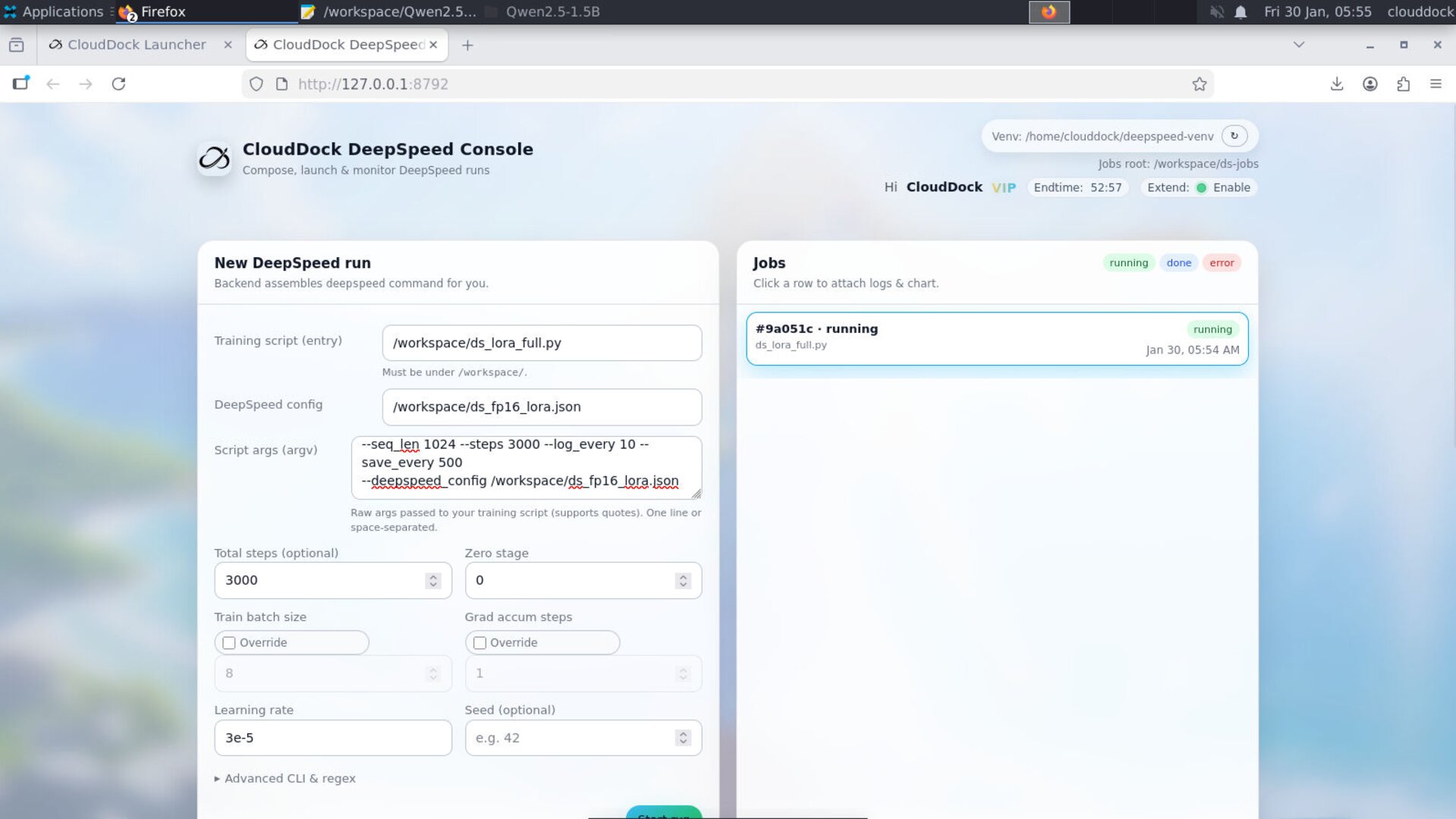
What’s new in 1.0.2 (vs 1.0.1)
- Stronger LLM training compatibility: better handling for modern training scripts and “real world” argument patterns.
- Dynamic runtime args: you can pass parameters at start time (no more “edit the script just to change lr/epochs/etc.”).
- Form override controls: you can disable front-end form parameters, or force override to guarantee deterministic runs.
- Built-in mini error tips: common failures get short hints so you can fix faster (without digging through 500 lines of logs).
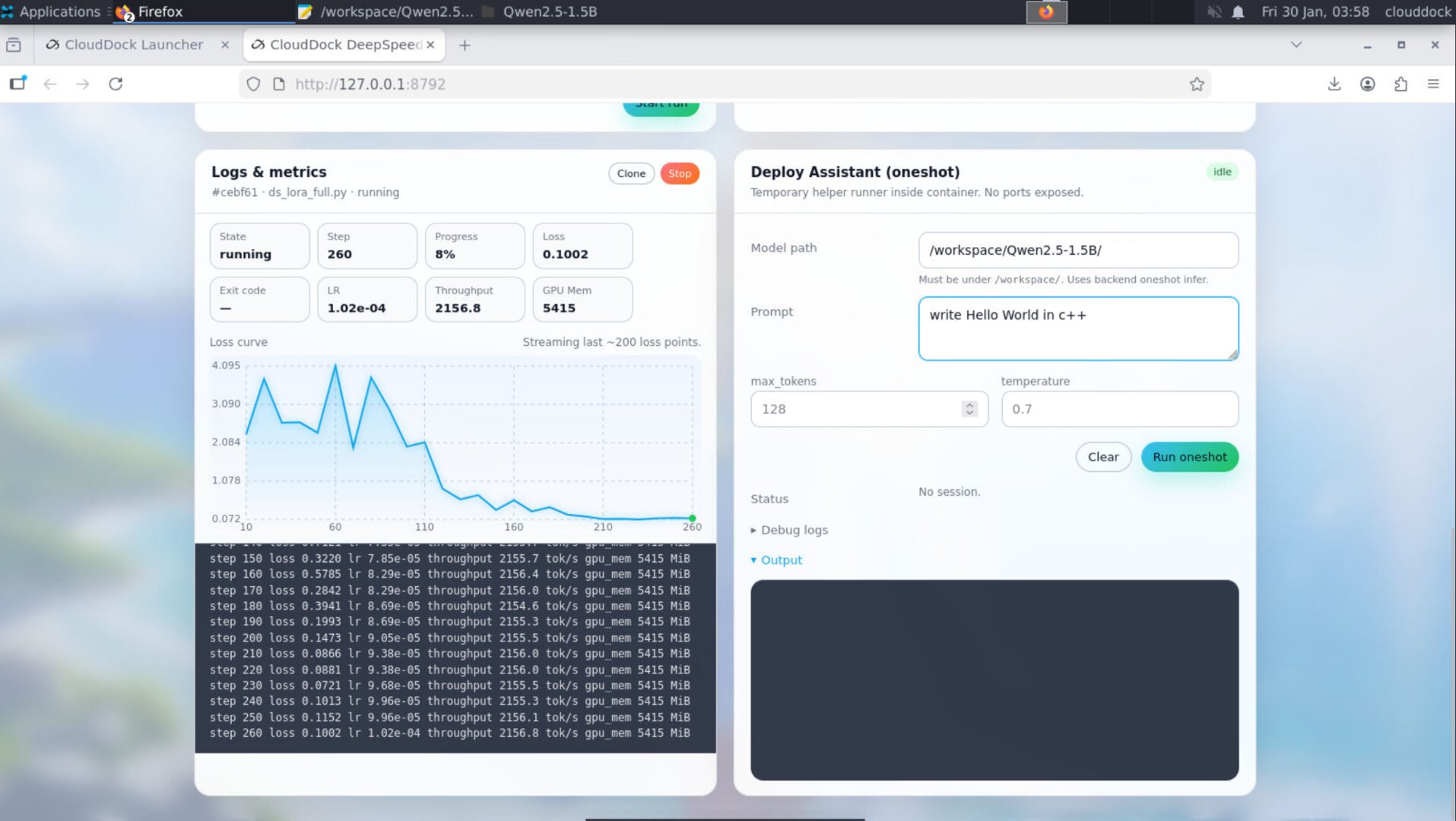
- New indicators: in-site progress + VRAM usage + speed metrics to confirm the run is healthy at a glance.
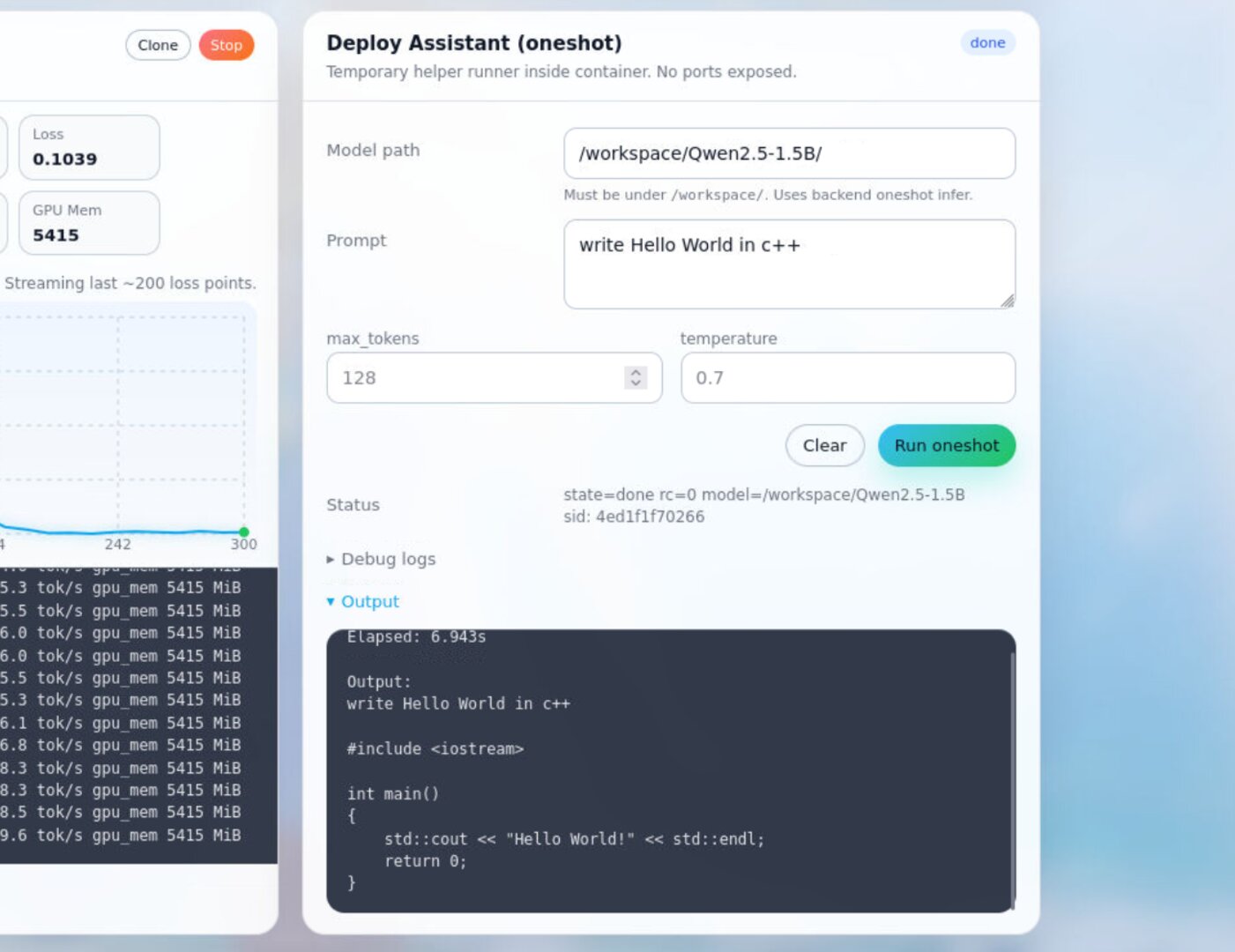
- Deploy Helper (NEW): after training, test the model immediately inside the instance — no need to move files back to your own computer just to verify outputs.
- Ecosystem parity with Universal Usagi 4.1.3: VIP badge + end-time countdown + CloudDock Pass “Extend” status indicator.
- Bug fix: Appstore now avoids a class of interrupted installs that could get stuck mid-way.
Two ways to run training
1) CLI mode (terminal)
CLI is still the highest-control path: custom configs, debugging, distributed settings. 1.0.2 adds better compatibility for LLM-style scripts and makes it easier to keep arguments consistent.
# Example (single GPU)
deepspeed --num_gpus=1 train.py \
  --dataset /workspace/data \
  --output_dir /workspace/output \
  --lr 3e-5 --epochs 1 --batch_size 8


# Tip: keep dataset + outputs in /workspace (or your mounted storage) for clean transfers.
2) GUI mode (CloudDock DeepSpeed Console)
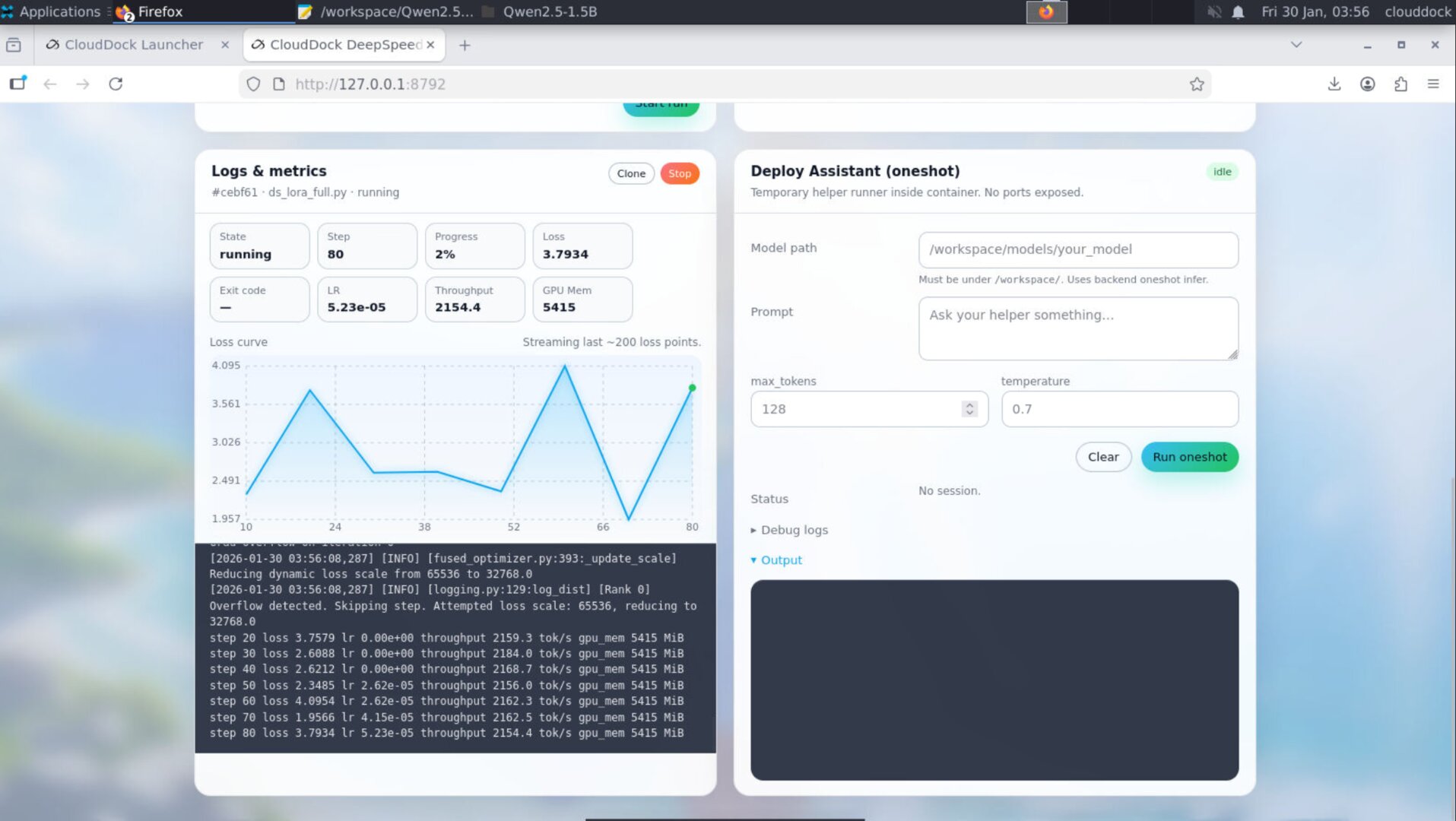
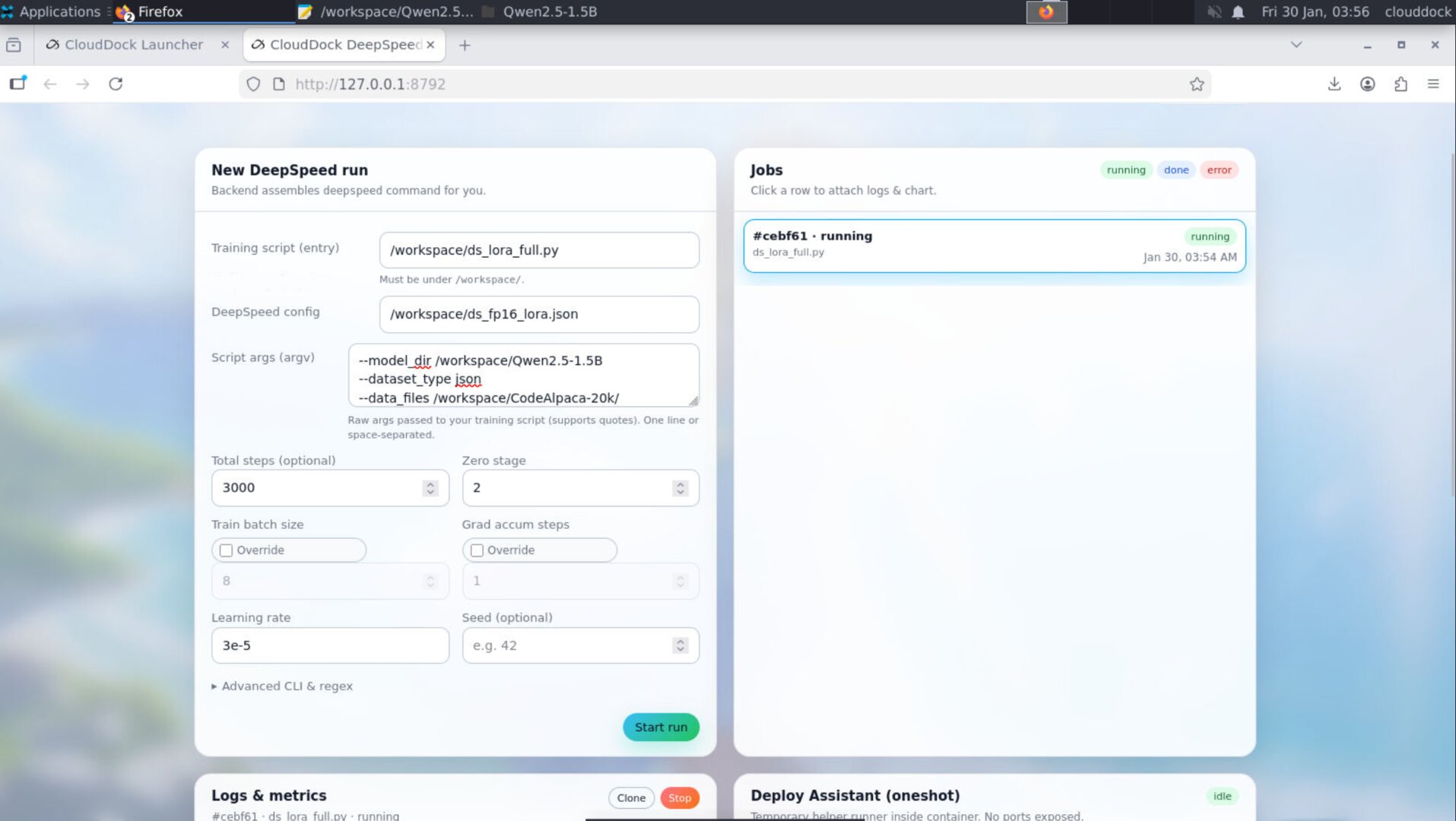
GUI is the fastest “blank instance → first run” path. In 1.0.2, you can dynamically pass args at launch, and you get real-time progress / VRAM / speed indicators plus small error hints when things fail.
Dynamic runtime args + override controls
1.0.2 introduces a clean policy for “where do arguments come from?” This solves two common problems: (1) people want quick GUI knobs, but also (2) advanced users want strict reproducibility and CLI-only control.
Argument sources
- Script args: arguments that are passed into your training script (
train.py). - Console form args: the GUI form fields (epochs, lr, batch size, etc.).
- Overrides: explicit rules that decide whether GUI fields apply or not.
Override modes (recommended)
- Normal (default): GUI form values apply (good for beginners and fast iteration).
- Disable form args: front-end form parameters are ignored (pure “script controls everything”).
- Force override: GUI form values always override script defaults (deterministic “console rules all” runs).
New indicators: progress + VRAM + speed
1.0.2 adds a quick-glance health panel so you can verify “is it actually training?” without staring at logs:
- Progress: step / total (or step-based progress when total is known)
- VRAM: current GPU memory usage (helps detect OOM risk early)
- Speed: tokens/sec or steps/sec style indicator (depending on the script / runner)
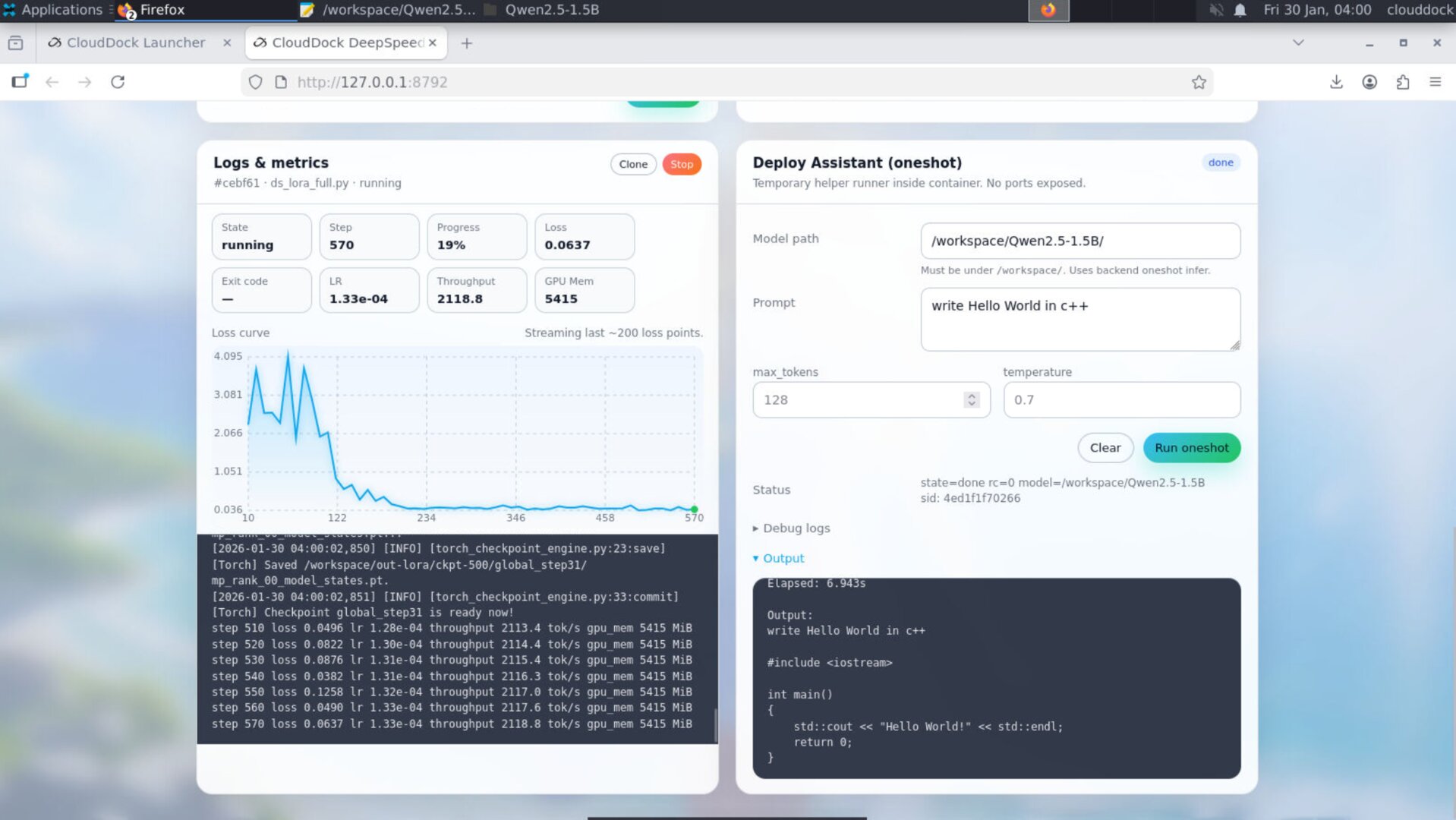
Deploy Helper (NEW): train → test instantly
The Deploy Helper is designed for the most annoying real-world loop: you finish training, then you have to move the model elsewhere just to test if it works. In 1.0.2, you can run a quick deployment test inside the instance and “take away” the final result with confidence.
What it does
- Spin up a lightweight test run for your trained output
- Feed a prompt and capture output immediately
- Show errors clearly (so you can fix right away and re-test)
Mini error tips (common issues)
When something fails, 1.0.2 will surface small “what to check next” hints. Here are the most common patterns you’ll see during LLM runs:
- Out of memory (OOM): reduce batch size, sequence length, gradient accumulation, or enable a more memory-friendly precision.
- Loss becomes NaN / explodes: lower LR, verify dtype/mixed precision setup, check dataset quality, start with a tiny run first.
-
Path not found:
confirm your dataset/model paths match where you uploaded them (recommended: keep in
/workspace/). - Dependency/module errors: confirm you are using the container’s intended environment (the included venv / runtime), and that your script requirements match the image.
Ecosystem integration (Usagi parity)
DeepSpeed 1.0.2 aligns with CloudDock Universal Usagi 4.1.3 experience:
- VIP badge: consistent identity & perks display across containers
- End-time countdown: clearer remaining time awareness before shutdown
- CloudDock Pass “Extend” indicator: quick status light for extendability state
Bug fix: Appstore install interruptions
1.0.2 includes an Appstore reliability fix for cases where installs could be interrupted mid-way. The goal: fewer “stuck” installs and a cleaner “install → done” experience.
Recommended folder convention
/workspace/
  train.py
  data/
  output/
  configs/
  deploy_tests/
Upgrade notes (from 1.0.1)
- If you previously relied on “edit script defaults for every run” — switch to dynamic runtime args.
- If your results varied run-to-run because of mixed parameter sources — use Force override.
- If you want maximum purity (script decides everything) — use Disable form args.
- After training, validate with Deploy Helper before exporting or presenting results.
- Jupyter + TensorFlow: TensorFlow is now preinstalled in Jupyter — open a notebook and start training immediately.