

1Open the Login page
Go to the CloudDock website and click Login.

Login button on the CloudDock website
2Click “Register”
On the Login page, click Register to open the sign-up form.

Register button
3Fill in your information
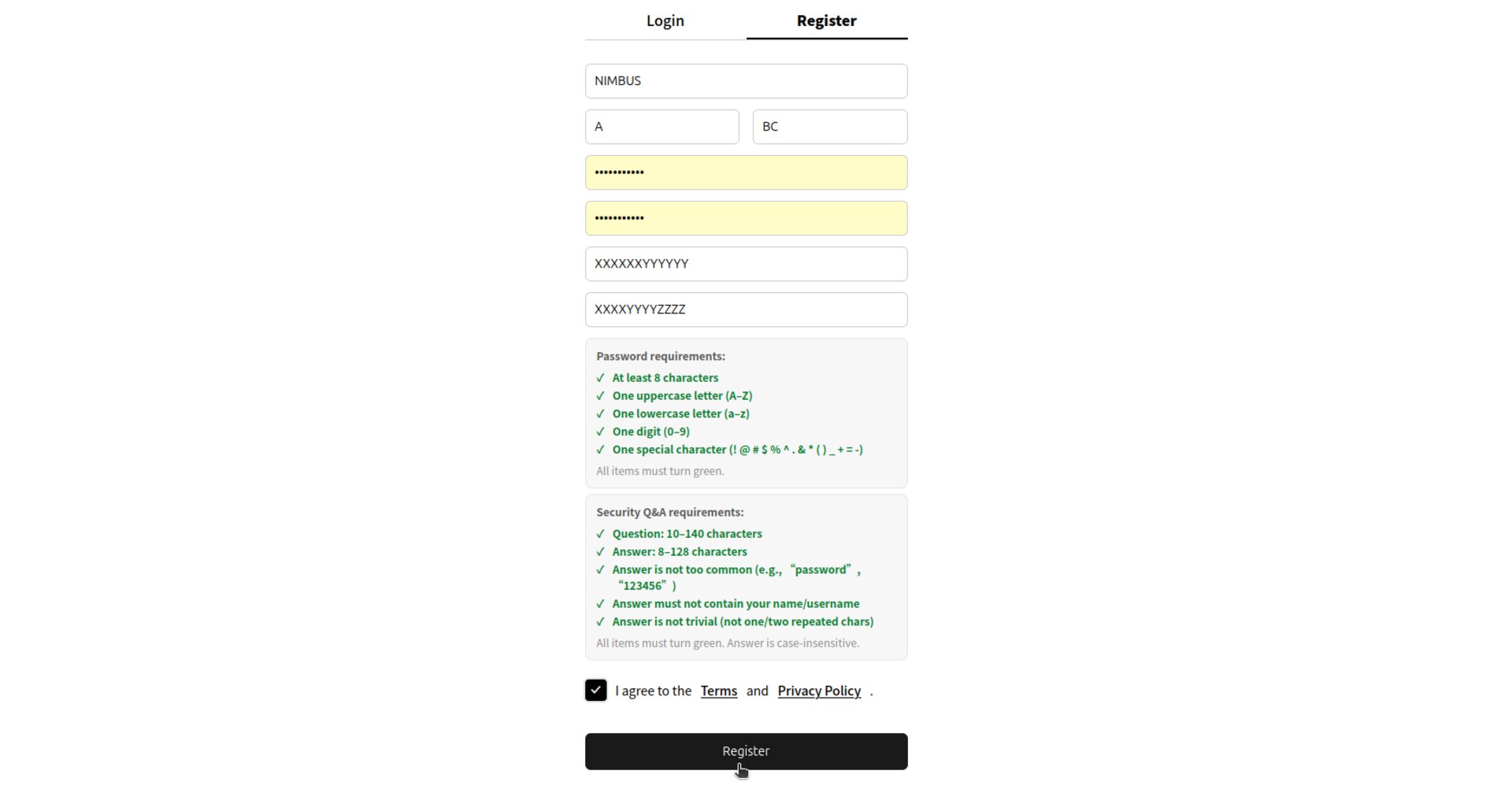
Complete the form and make sure all requirement indicators turn green.
Password requirements
- At least 8 characters
- Includes 1 uppercase letter (A–Z)
- Includes 1 lowercase letter (a–z)
- Includes 1 digit (0–9)
- Includes 1 special character (for example:
! @ # $ % ^ . & * ( ) _ + = -)
Security Question & Answer requirements
- Question: 10–140 characters
- Answer: 8–128 characters
- Answer must not contain your name or username
- Avoid common/trivial answers (e.g.,
password,123456, repeating characters) - Answer is case-insensitive

Registration form
4Agree to Terms & Privacy Policy
Check I agree to the Terms and Privacy Policy, then click Register to finish.
Complete registration
Tip:
Keep your Security Answer somewhere safe. CloudDock may use it to help you recover access to your account.
Welcome to CloudDock — you can now log in and start using the Dashboard.