
The core idea (why most ControlNet stacks look stiff)
When people first discover ControlNet, they crank everything to max: high weight, full steps, multiple strong controls. The result is “perfect structure” — but also:
- stiff limbs
- dead mannequin posture
- robotic hands
- faces that look pasted on
For anime-style work, the best results usually come from a hierarchy:
Let pose guide the body gently, let face guide identity moderately, and let hands lock down anatomy where the model tends to fail.
When to use these presets
- You have a pose reference but want style freedom
- You want better hands without over-controlling the whole image
- You want faces consistent while still allowing expression
- You’re on smaller VRAM and need a predictable stack
Preset stack overview
The most common and useful trio:
- Pose (OpenPose full body) — gentle global guide
- Hands (OpenPose hands / hand-focused) — strong correction
- Face (OpenPose face / face detail) — medium identity anchor
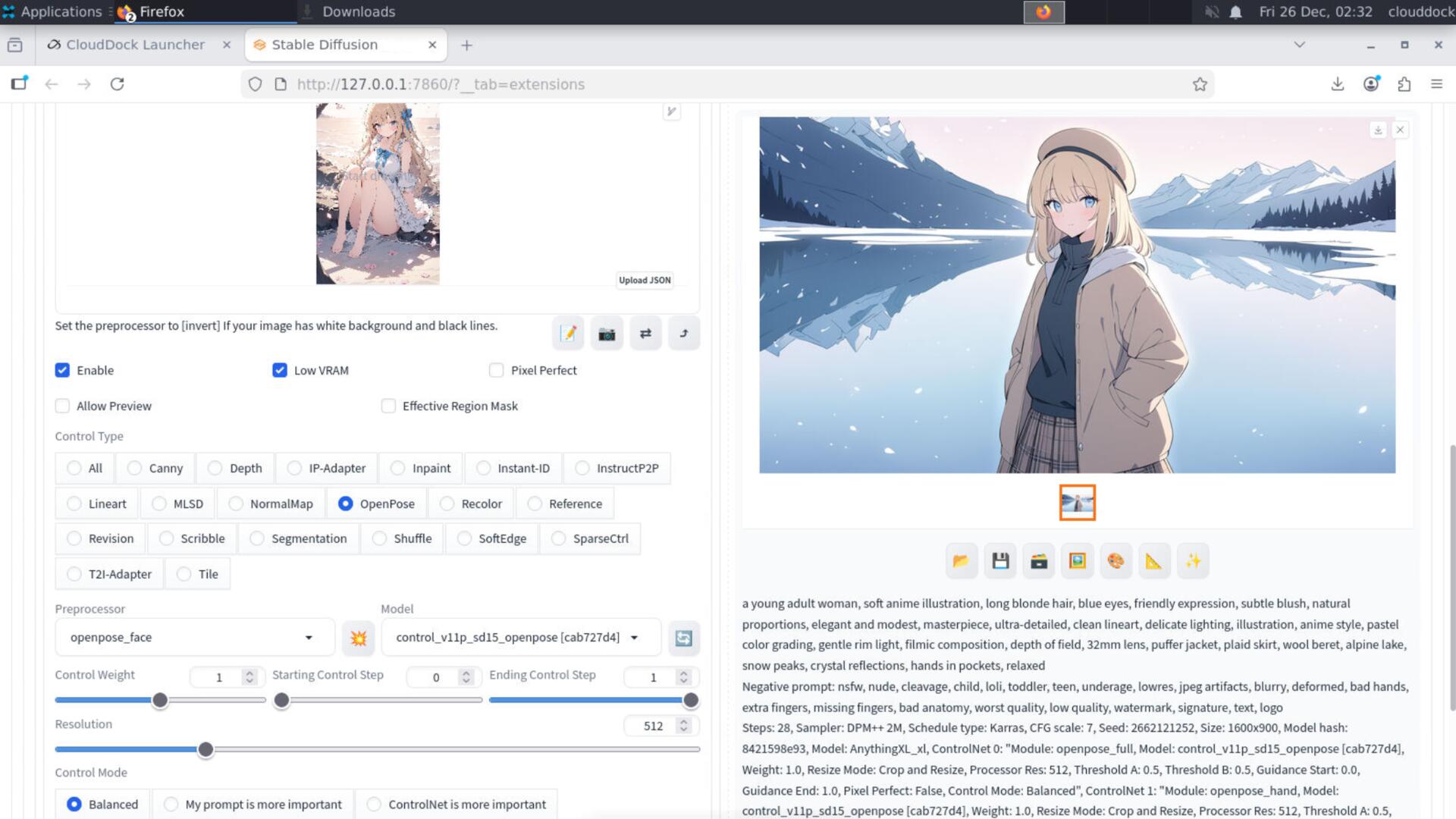
Preset: Standard anime stack
This is the default we recommend for anime-style outputs. It keeps motion and mood while preventing the most common anatomy failures.
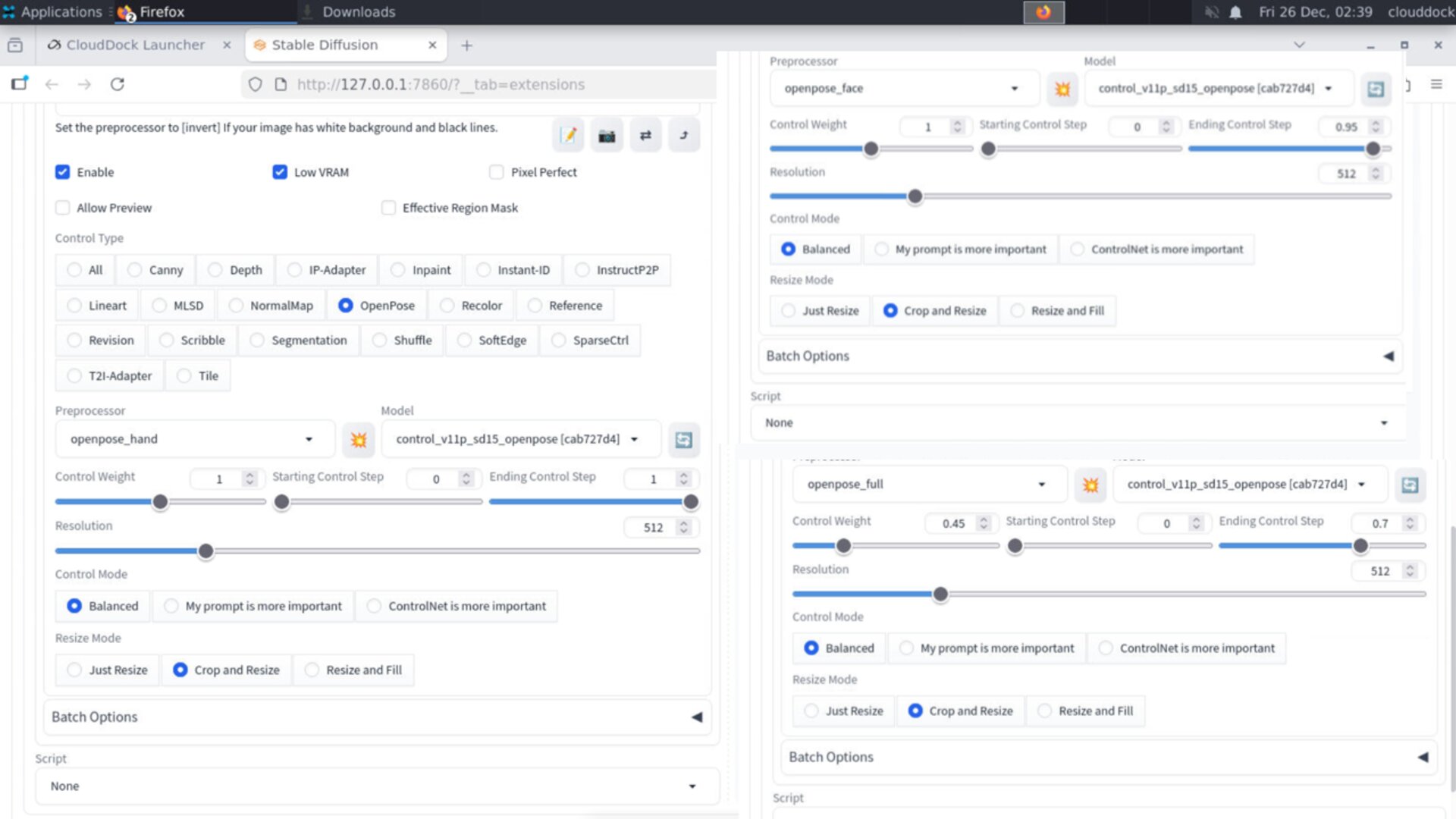
- Weight:
0.35–0.55 - Start / End:
0.00 → 0.70 - Goal: hint the silhouette, don’t freeze the character
- Weight:
0.55–0.75 - Start / End:
0.10 → 0.85 - Goal: keep identity & proportions, allow expression
- Weight:
0.80–1.10 - Start / End:
0.00 → 0.95 - Goal: stop finger meltdown and “glove hands”
Why Start/End steps matter (the secret anti-mannequin tool)
If ControlNet controls the entire sampling process (start 0 → end 1), you get stiffness. The model never gets a chance to “draw naturally.”
Ending Pose earlier (end ~ 0.70) is the simplest way to avoid mannequin-fu:
- early steps: pose guides structure
- late steps: the model adds natural detail and style
VRAM-friendly notes (A-group)
ControlNet costs VRAM. On smaller GPUs, use a “lean stack”:
- Keep ControlNet slots to 2–3
- Prefer moderate resolutions (don’t start at 2K)
- Batch size 1 while using ControlNet
- If you also use hires, keep it at 1.3× and low denoise
Quick fixes
“It looks stiff / mannequin-like.”
- Lower Pose weight to
0.35–0.45 - End Pose earlier (
end 0.60–0.70) - Keep hands strong, not pose strong
“Face changes too much.”
- Increase Face weight slightly (
0.70–0.85) - Start Face a bit later (
start 0.10–0.20) - Don’t overload the prompt with new identity words
“Hands still broken.”
- Increase Hands weight (
0.95–1.15) - Make sure the hand reference is clean (clear fingers, not tiny blur)
- Use inpaint targeted repair on hands after generation
A starter prompt that plays nicely with ControlNet
Keep the prompt clean. ControlNet already gives structure.
anime illustration, 1girl, dynamic pose, clean lineart, detailed eyes,
soft lighting, high contrast, sharp focus, masterpiece
Negative starter:
extra fingers, missing fingers, deformed hands, bad anatomy, mannequin, stiff pose,
blurry, lowres, worst quality
What’s next?
-
Two-stage hires ladder: 1.3× first, low-noise repair second.
Go to “Two-stage Hires →” -
ControlNet & Hires Fix: the full non-mushy workflow.
Go to “ControlNet & Hires Fix →” -
img2img + Inpaint repair: targeted fixes for face and hands.
Go to “img2img Basics →”